Multi-degree ZigZag
The swing threshold scales with ATR at each of the five degrees, so Primary and Minuette live on the same chart without redrawing the structure by hand.
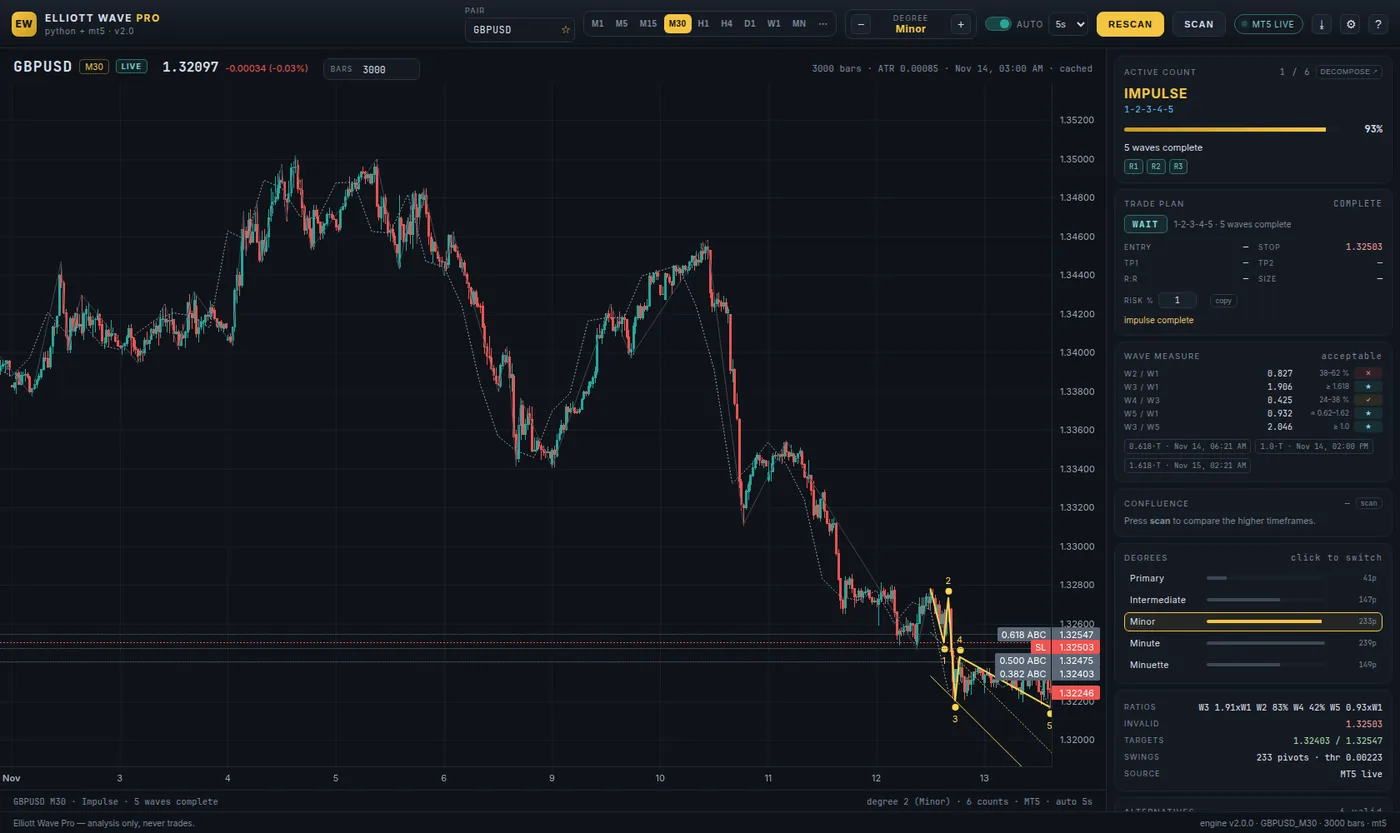
Five degrees, 13 rule-checked structures, ranked alternatives, the invalidation level and a complete trade plan — computed from your own MetaTrader 5 terminal. Not a screenshot, not a signal group, not an indicator that redraws itself every hour.
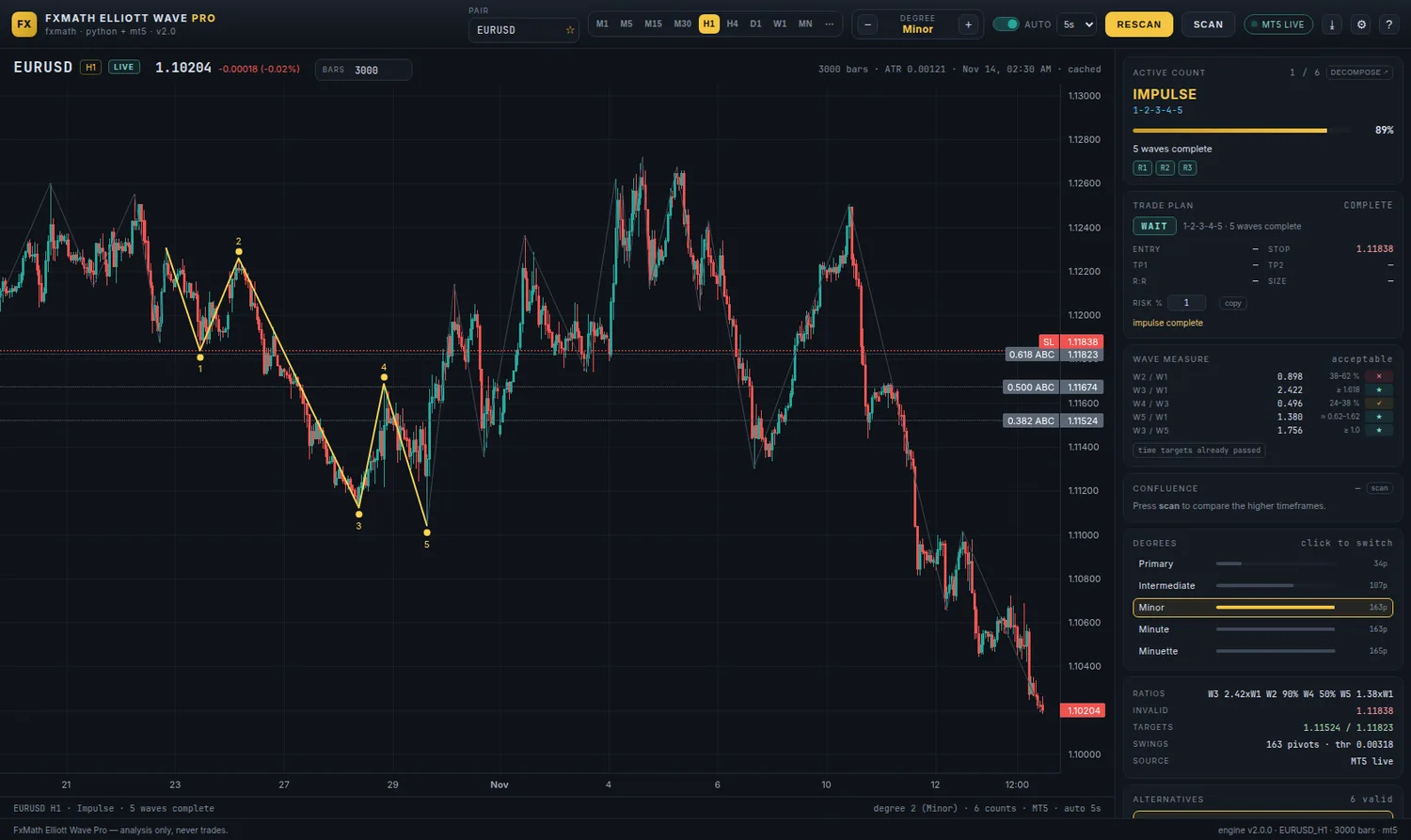
The engine and the drawing are the same thing: every label, level and target is derived from the pivots you can see, so the plan can never disagree with the chart.
The swing threshold scales with ATR at each of the five degrees, so Primary and Minuette live on the same chart without redrawing the structure by hand.
R1, R2 and R3 are enforced before a count is shown: wave 2 never retraces 100 %, wave 3 is never the shortest, wave 4 never enters wave 1 territory.
Six readings of the same pivots, scored on rule compliance, Fibonacci proportionality and recency — so you can see what happens if the market disagrees.
Every count carries the price that voids it. It becomes the stop, and it is the only line that decides whether the idea is still alive.
TP1 and TP2 from the wave-1 and wave-3 projections, with reward-to-risk and position size from your risk percentage.
Multi-pair scanner, H1/H4/D1/W1 confluence, walk-forward backtest, journal, alerts and a shareable report image.
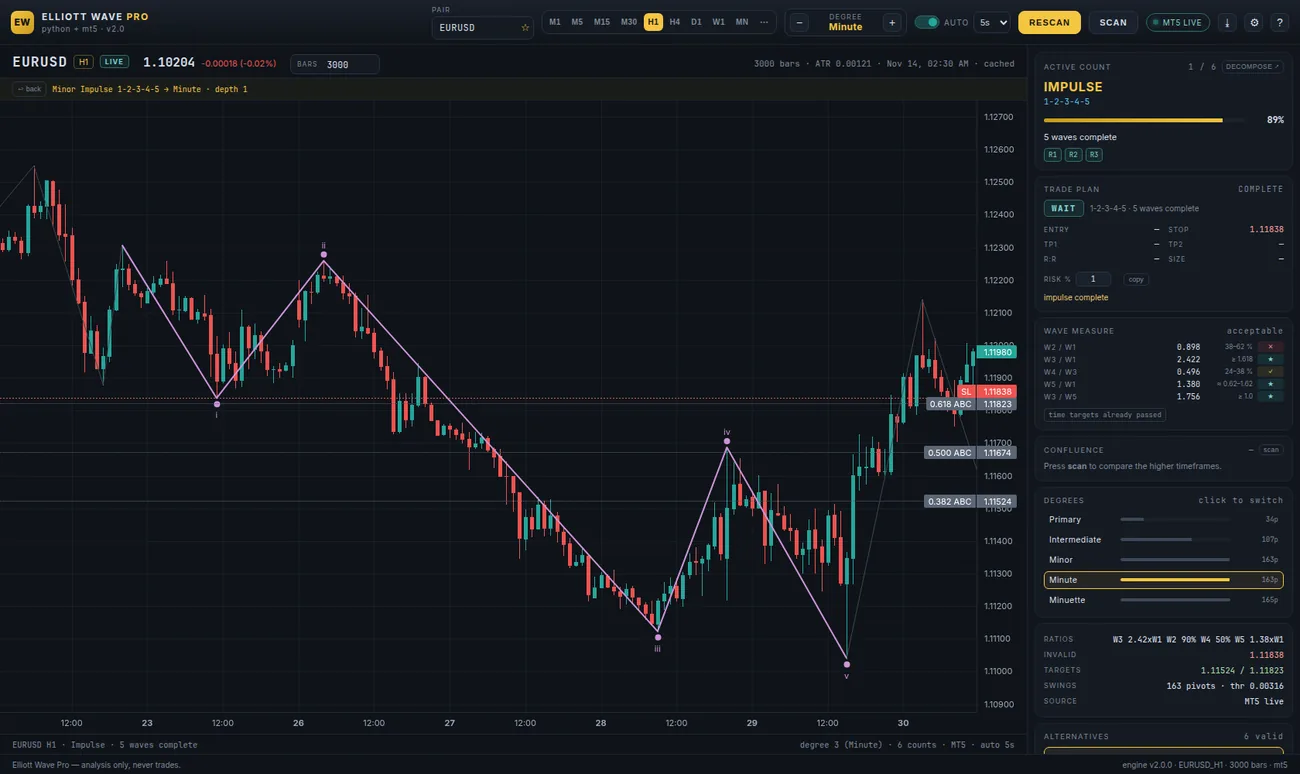
Degrees are labelled with the notation you already use — [1]…[5], (1)…(5), 1…5, i…v. The structure is checked against the three rules before it is drawn, and the wave ratios are printed beside it.
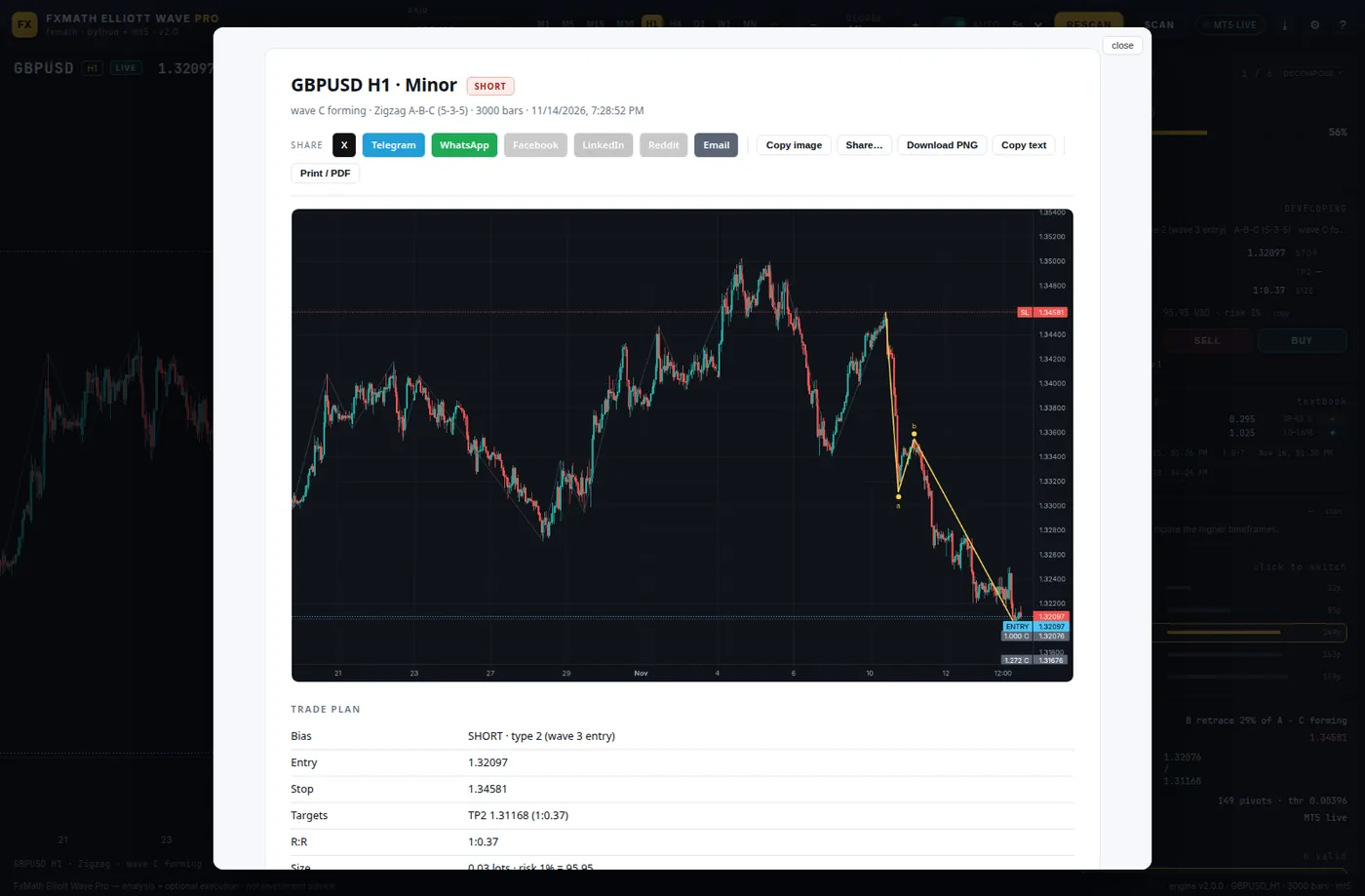
Bias, entry, invalidation stop, TP1 and TP2, reward-to-risk, position size for your account. If the plan is poor, it says so: late wave-5 entries are flagged instead of being dressed up as opportunities.
Scan a basket across timeframes, check whether H1 agrees with D1, replay the rules walk-forward without look-ahead, then keep a journal of what you planned and what happened.
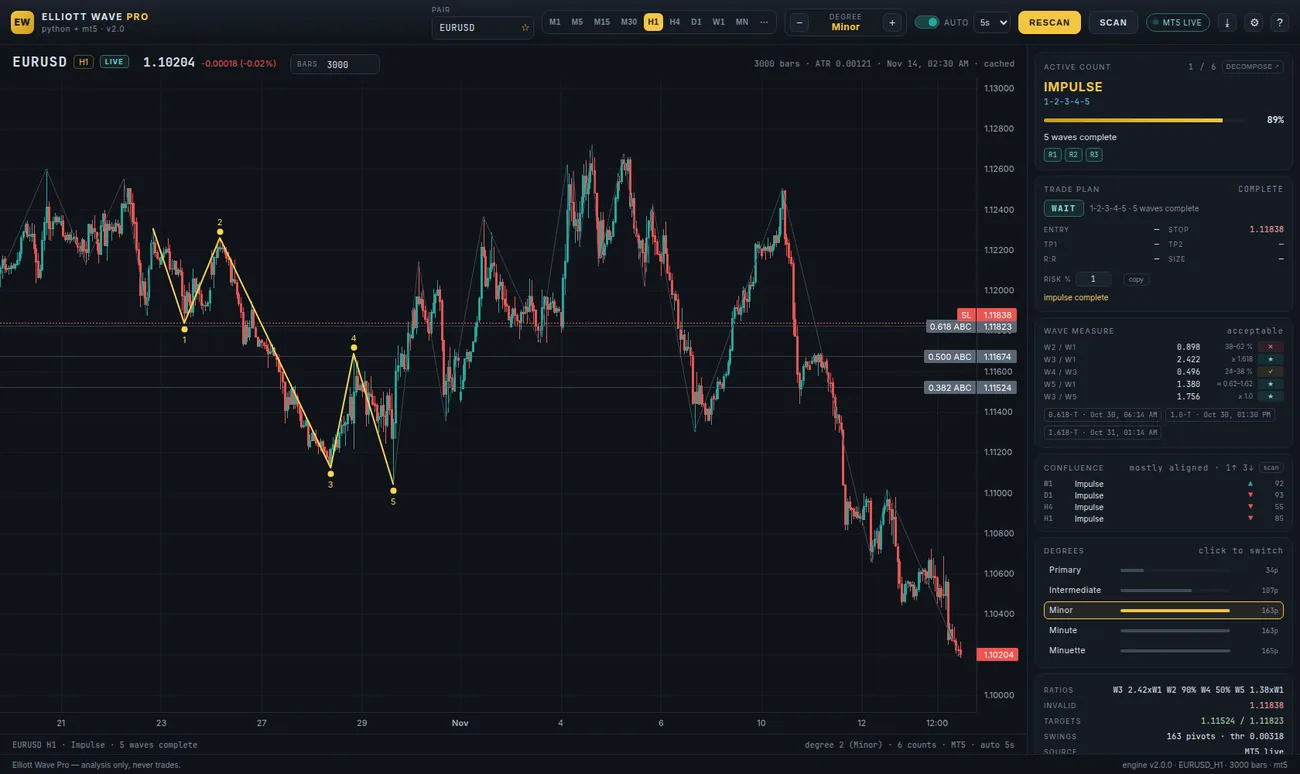
Automatic counts do not replace your work. Trendlines, parallel channels, Fibonacci retracements and labels live on the same chart, and one key wraps the active count in an auto channel. Every drawing is saved per pair and timeframe.
Because a line is not a count. Here is what changes when the rules, the degrees and the alternatives are part of the same engine.
| Free ZigZag / wave indicator | Counting by hand | Elliott Wave Pro | |
|---|---|---|---|
| Degree separation | One, sometimes two | Subjective | Five, ATR-adaptive |
| Rule checks (R1/R2/R3) | Rarely enforced | When you remember | Enforced before drawing |
| Alternative counts | None | In your head | Six, scored and ranked |
| Invalidation level | No | By eye | On every count |
| Targets & position size | No | Separate spreadsheet | TP1/TP2, R:R, lots |
| Time to a full reading | — | 20–40 minutes | About two seconds |
| Works on your broker's feed | Usually | Yes | Yes — same terminal |
| Cost | Free | Free, plus your evening | $199 once |
Comparison describes the general category, not any specific product. Figures are the ones the app reports for its own runs.
The app finds the MetaTrader 5 terminals installed on the machine and asks which one to use. Your broker, your login, your symbols — nothing is uploaded anywhere.
21 timeframes, any symbol the broker offers, and a custom bar window when a scan needs more history than the default.
The active structure, the alternatives, the invalidation and the plan appear together. If nothing qualifies, it says so instead of inventing a count.
No subscription, no seat rentals, no “pro” tier that unlocks the rules that should have been there in the first place.
FxMath Elliott Wave Pro 2.0 is designed for Windows; Linux and other platforms run it through Wine · paid in crypto, no card needed.
Crypto payment only for now — the checkout page shows the accepted coins and the address. The download link and your licence arrive by email once the payment confirms, usually within minutes. Questions before you buy? Ask anything first — [email protected] or Telegram.
Already own a FxMath tool? Write to support and ask about the existing-customer price.
Confirmed pivots do not move when new bars arrive. The last leg is provisional until the reversal threshold confirms it, and the active count switches when price breaks its invalidation — that is the rule engine working, not history being rewritten. Every switch is visible in the alternatives panel, with the count that replaced it and the score it carried.
The app is designed for Windows and runs natively against any MetaTrader 5 terminal. On Linux and other platforms it runs through Wine, using the MT5 terminal already installed in that Wine prefix — the MetaTrader 5 Python API is Windows-only, so Wine is the bridge, not a different data source.
No. No MQL5 expert advisor, no virtual server, no paid feed. The app reads bars straight from the terminal on your machine. The terminal has to be running and logged in for live data; if it is closed, the app falls back to the sample series that ship with it.
It can, and it is off by default. You get the plan first — bias, invalidation stop, TP1/TP2, reward-to-risk and size. Execution, breakeven and trailing stops (as a percentage of the TP distance) are opt-in, live trading sits behind a second switch, and the demo account is the place to try them.
Crypto only at the moment: the checkout page on fxmath.com shows the accepted coins, the address and the amount, and confirms the order when the transaction is seen. Your download link and licence key are emailed to the address on the order — normally within minutes, and always within a few hours if the network is busy. Keep the order email: it is your licence. If nothing arrives, message @FxMath with the transaction id.
Any symbol the broker offers — FX, metals, indices, crypto, energies — on all 21 of the terminal's timeframes, from M1 to MN. Scans and research can use custom bar windows such as 3 000 or 5 000 bars.
The licence is tied to one machine. Replace the hardware and the licence is moved for free: send the order number and the new machine id to support.
All 2.x updates are included for the lifetime of the licence. The manual on this site is the document that ships inside the app, so it always matches the build you are running.